
“Adding a video editing SDK sounds simple – until your app starts slowing down.”
Most modern apps are adding video editing as short-form content continues to drive engagement and retention. Allowing users to create and share videos directly inside the app increases activity, time spent, and content generation; all key growth metrics. Because of this, integrating a video editing SDK often looks like a quick product upgrade.
In reality, it’s a system-level decision, not a simple feature addition. Video processing affects performance, storage, infrastructure load, and analytics visibility. Without proper planning, what seems like a straightforward integration can slow your app, strain backend resources, and create hidden technical debt across the entire platform.
Performance Takes the First Hit
-
App Size Increases
When you add a video editing SDK, your app size increases significantly. These SDKs include heavy libraries such as FFmpeg, rendering engines, filters, and effect packs. This increases the APK or IPA file size. A larger app takes more time to download and install. It can also reduce install rates and increase the likelihood that users uninstall the app due to storage constraints.
-
Higher RAM and CPU Usage
Video editing requires continuous processing. Real-time previews, filters, and effects that heavily tax CPU, GPU, and memory. Memory usage also increases during editing and exporting. On high-end devices, this may work smoothly, but on low-end devices, it can cause lag, freezing, or even crashes. Battery consumption also increases because of heavy processing.
-
Slower App Startup Time
Video SDK components need to be initialized when the app launches. Large libraries increase loading time. Some background services may also start during initialization. As a result, users may perceive the app as slow even before they begin editing.
Your UX Starts Cracking
Even if performance holds, the user experience can still suffer. The first signs usually appear in the interface.
-
UI Conflicts
When you add a video-editing SDK, the design may not align with your app. The buttons, colors, and layout may vary. Even if you try to customize it, there are limits. As a result, the editing screen may feel like a separate app within your app. This breaks the smooth experience users expect.
-
Complex Workflows
Video editing isn’t a simple action. Users must edit the video, wait for export, and then upload it. Each step takes time. If the video is large, exporting can take longer. Uploading can also be slow. If users have to wait too much, they may leave before finishing.
-
Unexpected Edge Cases
Video editing introduces multiple edge cases that must be handled correctly. A user may cancel while the video is exporting. They may close or minimize the app. Their internet connection may change during upload. If these situations are not handled properly, the video may fail, or the app may crash. These small issues can create a bad user experience.
Backend Infrastructure Struggles
-
Storage Costs Increase
Your app’s storage requirements increase rapidly when you add video editing. Raw video files are large. The program frequently stores a freshly processed version of the same video after editing. Multiple export formats, such as those with varying aspect ratios or resolutions, are occasionally produced. This means multiple versions of the same video can consume storage. Over time, this increases server storage costs and database load.
-
Upload Failures Become Common
Compared to text data or photos, video files are substantially larger. Stable network connections are essential when uploading large files. Uploads may not succeed if the network is unreliable or weak. Users might have to restart the upload from the beginning if error handling and retry logic are not implemented properly. It becomes crucial to manage timeout settings, resumable uploads, and chunk uploads. It could lead to a poor user experience and additional support issues if not handled properly.
-
CDN and Streaming Challenges
Once videos are uploaded, they need to be delivered smoothly to other users. This requires proper CDN configuration. Adaptive bitrate streaming is necessary for large video files to adjust quality based on the user’s internet speed. Videos may buffer or load slowly if playing is not optimized. To guarantee seamless playback across devices, control over compression, encoding formats, and streaming protocols becomes essential.
Your App Stability Is at Risk
-
Crashes on Low-End Devices
Video editing features require significant memory and processing power. Low-end devices often have weaker processors and limited RAM, increasing the risk of crashes if resources aren’t managed efficiently. Intensive rendering can also overload the GPU, and some devices may lack full graphics support, resulting in freezes or unexpected crashes.
- OS Version Conflicts
Not all devices run the same operating system versions. Android is highly fragmented, and SDK behavior can vary across versions, even if it works perfectly on one. On iOS, system updates can change how background tasks, permissions, or media processing function, potentially breaking SDK components and requiring urgent fixes.
-
Third-Party Dependency Risks
Integrating a video editing SDK means relying on the vendor for updates and bug fixes. New SDK releases can introduce breaking changes, and updates may be required to remain compatible with newer OS versions. Over time, tight integration can also create vendor lock-in, making it costly and difficult to switch providers.
Analytics & Tracking Break
Adding a video editing SDK can reduce visibility into user behavior during the editing flow. Because much of the interaction occurs within the SDK environment, tracking specific user actions is difficult. As a result, analytics data may be incomplete, making it harder to identify where users drop off; whether during editing, exporting, or publishing. Limited access to detailed behavior data also restricts optimization efforts and weakens data-driven decision-making.
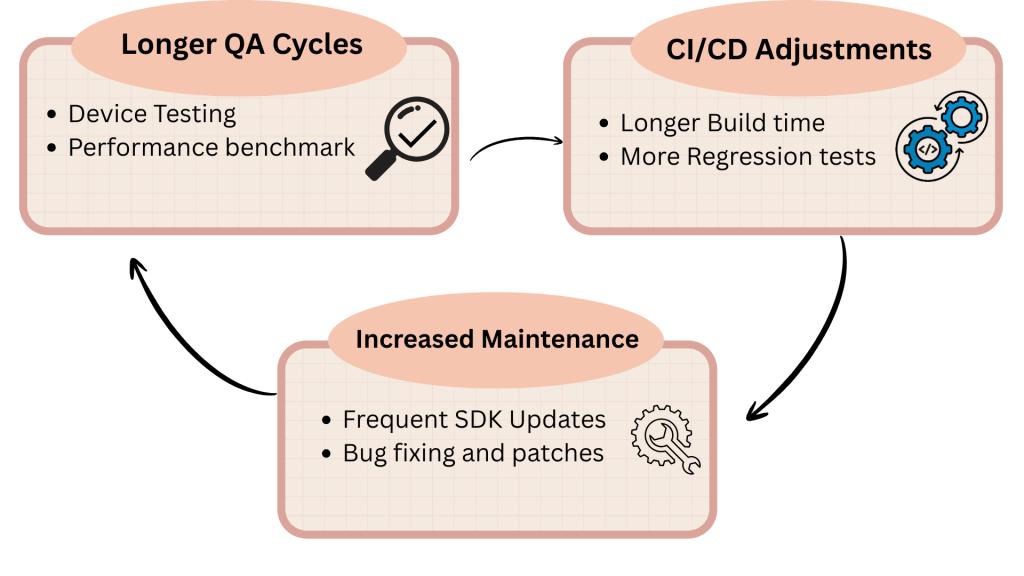
Development Team Workflow Gets Complicated
What you should do to not break it (If You Plan Right)
- Choose Modular SDKs
Choose SDKs with modular integration capabilities. This implies you only incorporate what you truly need. Don’t load extraneous tools, effects, or filters. Your software will be lighter and easier to maintain if you use a modular approach.
- Lazy-Load Heavy Components
When the app first launches, don’t load the whole video engine. Heavy components should be loaded only when the user reaches the editing screen. Performance improves, and startup time decreases with lazy loading.
- Use Cloud Rendering Where Possible
Video rendering can be performed on the server rather than on the device. Cloud rendering reduces CPU and memory pressure on user devices. This is especially useful for low-end smartphones.
- Implement Proper Compression Pipelines
Make sure videos are optimized before sharing or keeping them. Use efficient codecs and compression settings to reduce file size without compromising quality. This reduces storage costs and accelerates uploads.
- Start with low-end devices for testing
Always test on older processors and devices with less RAM. It will also perform well on high-end smartphones if everything runs properly. In practical use, this avoids unplanned crashes.
- Track Performance Indicators After Integration
Monitor parameters such as upload success rate, crash rate, rendering time, memory consumption, and app size. You can detect problems early and gradually improve performance with ongoing monitoring.
Video Editing Is a Product Decision, Not a Feature
Adding video editing to your app isn’t a small enhancement; it’s a product-level decision that reshapes your entire system. It affects architecture, increases infrastructure demands, raises storage and processing costs, and changes user expectations for performance and responsiveness. Supporting video workflows often requires redesigning core components, strengthening backend capacity, and planning for scale from day one.
When done right, video can transform engagement and unlock new growth. But without proper planning, it can slow your app, strain your systems, and frustrate users. Video editing isn’t just another feature; it’s a capability that redefines your app’s technical foundation.
“Adding a video editing SDK doesn’t just add features – it reshapes your entire app ecosystem.”
Thinking of adding video editing to your app? Treat it like a platform upgrade, not a feature release. Audit your performance, infrastructure, and scalability first; your users will feel the difference.
